Organize events—without giving up everyone’s privacy.
Invite people, collect RSVPs & gather registration details.
About Zenvite
Sample pages
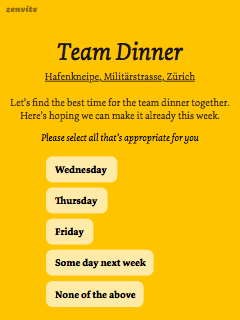



How Zenvite works
- Create a page (no signup needed)
- Share the page to invite people
- Start collecting responses
Use Zenvite pages to…
- Invite people and collect RSVPs.
- Capture registration data for events.
- Schedule appointments.
- Conduct polls.
Everyone’s on the same page. All responses, the latest updates, and all comments are in a single place. Notifications and emails keep everyone updated and help make sure nobody forgets. You invite people. Zenvite keeps the page up to date.
RSVP in a few taps. A few taps or clicks are enough to respond. No need to sign up anywhere or be a member of a social network. Just enter your name. If you want to use your avatar and receive notifications, you can log in with your email address, or via Apple, Google, Microsoft, etc.
Recurring events with automatic reminders. Everyone gets a reminder before each occurrence. People can tap the RSVP buttons in the email, and the results are immediately available on the page. You can easily skip or reschedule individual occurrences. Repeating can be modified or turned on & off any time.
Clever features. Pages are ready to use right away, and you can fine-tune the settings whenever you need more. For example: hide responses and comments; specify the minimum and maximum number of participants; set up a response deadline; and so on…
Why Zenvite
- Private by design. No trackers, no surveillance.
- Access can be fine-tuned for custom scenarios.
- Quick polls help you find the date and place that work for most people.
- Turn on notifications when you need to stay on top of things.
- Automatic reminders for recurring pages.
- Advanced settings for special cases.
So much better than ad hoc planning (email, texting, etc.)
- Start from useful templates.
- Include custom questions.
- People can respond with a single tap.
- Every response and the latest updates stay in one central place.
- Anybody can RSVP from any device. No app required.


Get everyone on the same page
Create a new Zenvite page whenever you need RSVPs, a poll, or help scheduling an event.

Organize events of all sizes:
- online and offline meetings
- conferences, workshops
- sports events and training sessions
- parties and meals out
- classes and courses
- weddings
- etc.
Every page can be recurring. You can add new occurrences manually, or set up automatic repeats weekly, monthly, or in any other way.
Be the best-organized organizer. Invite everybody.
Get early accessAbout Zenvite
 Design & implementation by Gabor Lenard, working as a designer & software engineer in Switzerland. On Mastodon as @zengabor@mastodon.social.
I started working on Zenvite to help my friends with weekly basketball and soccer games, going to the cinema, and ordering food for the office. My friends still help with advice and ideas; these days, so do my wife and kids.
Privacy is important to me and many of my friends. We don’t want to use apps that allow advertising companies to silently harvest everyone’s data. Zenvite was built from the ground up to protect its users’ privacy; it stores as little information about people as possible, and protects their identity. There are currently no ads on Zenvite, and even if we ever need to add them to cover hosting costs, we will never allow third-party scripts that track people.
I am also grateful for the work of others:
- Animal drawings: Balázs Gracza
- Fonts: Underware
- Icons: Lucide (with refinements)
We’re happy to receive comments & suggestions.